
Common School Visitor Management Mistakes on Long Island
Strong Visitor Management Protects Daily School Life
Strong visitor controls are now part of everyday school life on Long Island. Front offices handle a steady stream of parents, delivery drivers, contractors, and community visitors, often all at the same time. While staff are answering phones and helping students, they are also expected to make quick decisions about who comes into the building, where they can go, and how long they can stay.
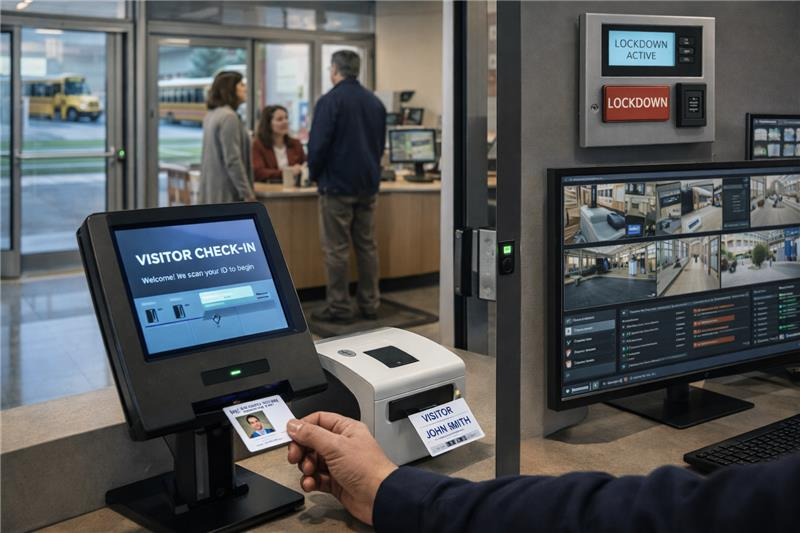
A school visitor management system is not just a kiosk, a paper sign-in sheet, or a plastic badge. It is the full set of tools and steps your staff use to greet, verify, track, and, when needed, restrict visitors. That includes your main entrance hardware, camera views, ID checks, badges, alerts, and the rules your team follows every time someone asks to come inside.
On Long Island, many districts searching for a school visitor management system want to answer a few basic questions:
– How do we know who is in the building right now?
– How do we keep visitors in the right areas and out of restricted spaces?
– How do we give parents and community members a smooth, respectful experience?
In our work with Long Island schools, we see that the most effective systems are the ones that fit daily school operations: arrival and dismissal, early pickups, service contractors, and special events. In this article, we walk through common mistakes we see in local schools and practical ways to correct them before the next semester or next school year rush.
Treating Visitor Management as “Just the Front Desk”
One of the biggest mistakes is treating visitor control as something that belongs only to the main office. When everything depends on one or two secretaries, you usually see different rules applied at different times of day. Substitutes or support staff may guess what to do. During an emergency, no one is fully sure who is in the building or where they should be.
We have seen districts where each building ran visitors in a different way. One school took IDs, another did not. One printed badges, another used stickers. During a district-wide lockdown drill, it became clear that visitor records were incomplete and hard to compare. That is a stressful way to find gaps.
A better approach is to treat visitor management as a school-wide safety process, not a single desk task. That means:
• Assigning clear roles for administrators, security staff, teachers, and office teams
• Creating one standard process that every building in the district follows
• Making visitor rules part of your emergency operations plan, not a separate office routine
In one Nassau County district we worked with, simply agreeing on one district-wide visitor procedure and training every school on it reduced confusion at the front desk and gave the superintendent a clear picture of who was on campus during drills.
When teachers, security, and office staff all understand the same process, it is much easier to keep visitors where they belong and to respond calmly when something feels off.
Relying on Paper Logs or Outdated Technology
Another common issue is depending on paper sign-in sheets or older badge printers that only record a name and time. These tools may seem simple, but they leave big gaps in safety and speed. Handwriting is hard to read, visitors forget to sign out, and there is no way to quickly screen someone against a restricted list or custody alert.
In an emergency or serious discipline case, staff and law enforcement need clear visitor history. With a paper log, someone has to flip pages by hand and hope everything was recorded. There is also no automatic way to check ID, confirm if a visitor is who they say they are, or flag if a parent should not pick up a child.
Modern school visitor management systems in Long Island are moving toward ID scanning, real-time screening, photo capture, and automatic record keeping. This supports both safety expectations and documentation needs when questions come up later.
From our on-site assessments, we often see schools trying to do too much at once and overwhelming office staff. A more manageable approach is to start by understanding what you already have and where the biggest gaps are:
• List what your current system actually does: ID verification, photo capture, alerting, reporting
• Decide your top priorities: better screening, faster entry, or stronger reporting
• Plan upgrades in phases so staff can learn each step, instead of changing everything in one week
A phased plan keeps daily school life steady while you raise the safety bar.
Ignoring the Parent and Community Experience
Visitor systems that only focus on rules and hardware can create a different problem: frustrated families. When parents do not understand why things changed or what they need to bring, they may push back at the door or try to talk their way past the process. Staff feel pressure to bend the rules, and lines in the lobby grow longer.
We worked with a Long Island K-8 school that rolled out a new system in the middle of the year. The technology worked, but the experience did not. There was little advance communication, signs were not clear, and parents had questions right at morning drop-off. Lobby lines grew, office staff felt stressed, and some visitors were waved through without full checks just to keep the line moving.
The fix was not dramatic. It came from clearer communication and simpler steps:
• Use clear, polite signs at the main entrance and in the lobby, in plain language
• Explain new procedures before they start, through email, auto-calls, and school events
• Offer a “what to expect when you visit” guide so families and contractors know which door to use, what ID to bring, and how long check-in usually takes
We have seen that when schools take time to explain why a system exists and how it works, families are more willing to follow it and less likely to argue at the door. That keeps the tone calmer for both visitors and front office staff.
Skipping Training, Testing, and Seasonal Updates
Visitor management tools do not stay effective on their own. A quick tutorial during installation is not enough. Staff change, features get forgotten, and new school events create new patterns of traffic. Without training and testing, even a strong system can fade into old habits.
Districts that get the most value from school visitor management systems in Long Island tend to schedule refreshers before school starts and again before major event seasons like winter concerts and spring conferences. That way, staff are not learning under pressure on the first busy night.
Helpful steps include:
• Adding visitor management training to your yearly professional development and new staff onboarding
• Running at least one tabletop drill that includes visitor check-in, denial of entry, and response steps
• Reviewing visitor workflows before seasonal events like registrations, field trips, and summer projects
In our experience, even a 30-minute refresher before a big event season can prevent long lines and hurried decisions at the door. These check-ins keep your system aligned with how your buildings actually operate.
Overlooking Integration With Lockdown and Access Control
A final mistake is treating visitor management, access control, and lockdown procedures as separate projects. If your visitor system sits on an island, it might look good at the front desk but fall short during an incident.
Common problems include visitors moving freely inside during a lockdown because badges do not link to any access rules, or front office staff trying to track who is in the building by memory when things are tense. This is exactly when a joined-up system should support them.
In one Nassau County school we worked with, the district upgraded visitor check-in but kept older door hardware in place. During testing, they found visitor badges did not actually limit movement inside. It took an integration plan to close that gap.
When thinking about integration, start simple:
- Review how your visitor system currently connects to access control, cameras, and lockdown steps
- Focus on high-impact connections first, like automatic badge printing and lobby camera views tied to check-in
- Bring IT, facilities, and safety leaders together to design a process that works both on a normal Tuesday and during a rare emergency
This team approach keeps daily operations and crisis plans aligned, instead of pulling in different directions.
Practical Next Steps to Strengthen Visitor Controls
Strong visitor management is more than a kiosk on the counter. It is the mix of clear tools, consistent procedures, and practiced staff that helps protect students and keeps the school day moving.
A simple starting checklist for Long Island schools is:
• Map your current visitor path from the parking lot to the classroom door
• Identify spots where everything depends on one person’s judgment instead of a clear policy
• Note your technology gaps, such as missing ID scanning, alerting, or access control links
• Choose one or two realistic improvements for the next semester and one larger project for the next budget cycle
At NCD Communications, our team regularly walks Long Island schools through on-site assessments, policy reviews, and phased upgrades like these. A clear look at your current process and a few focused changes can make your visitor management system more dependable before the next school year rush.
From our perspective, the goal is steady, sustainable improvement. When visitor controls support your front office, respect families’ time, and connect with your wider safety systems, they become a reliable part of daily school life, not just another system to manage.
Get Started With Your Project Today
If you are ready to modernize campus security and streamline front-office check-ins, NCD Communications can help you deploy reliable school visitor management systems in Long Island that fit your district’s needs. Our team will work with your administrators and IT staff to design a solution that integrates smoothly with your existing infrastructure. Reach out today to discuss your goals, timelines, and budget, or contact us to schedule a consultation.